 Audict
Speak. Audict writes.
Dictate in any app on Mac and Windows. Speech recognition runs on your computer and costs nothing.
Quick update for everyone: the launch moves to Thursday. Legal still has to sign off on the pricing page.


- LocalRecognition runs on your computer
- FreeSpeech recognition without a subscription
- Mac and WindowsMacs with an M chip, Windows 11 with Intel, AMD or ARM
- Made in GermanyBuilt and run in Germany
Your voice stays on your computer.
Speech recognition always runs locally. For the AI, you decide where your text goes, down to: nowhere.
Fully local
Ollama or any other AI with an OpenAI-compatible interface, such as LM Studio or vLLM, on your computer or your own server. On the Mac, Apple Intelligence too. Not a word leaves the building.
No retention
Through OpenRouter with Zero Data Retention, requests only go to providers that store nothing. Providers with servers in the EU connect through their OpenAI-compatible endpoint.
Your provider
Claude, Gemini, OpenAI, Groq or Cerebras with your own API key. The text goes straight there, never through Audict.
Works with
 Claude
 Gemini
- OpenAI
 OpenRouter
 Ollama
- LM Studio
- Groq
- Cerebras
- Apple Intelligence
For law firms and medical practices: with a local AI you get every Pro feature without a single word leaving the building.
Every data flow in detail
Stays with you
- Your recordings
- Speech recognition
- Your history
Goes out
- Sign-in, license, models, updates
- to the Audict server in Germany. You can turn updates off.
- AI post-processing, only with Pro and only when you turn it on
- text and dictionary straight to the provider you choose. Modes with context send more depending on the mode, such as selected text or the address in the browser. Context capture is on by default and can be turned off; a screenshot is only sent if you turn it on. With Ollama or Apple Intelligence, that stays on your computer too.
- Payment
- through Stripe in the browser.
- “Remove silence” on the Mac, only when you turn it on
- a small extra model from Hugging Face on first use.
No tracking in the app. Crash reports only if you allow them. Everything else is in the privacy policy.
Trademarks and logos belong to their owners. AI post-processing is part of Audict Pro.
One sentence. Three results.
With Audict Pro, an AI edits your dictation before it is inserted. You decide how.
“Hi Sam, um, so the release notes won’t be ready until Thursday because the screenshots from design are still missing, I’ll send them over as soon as they’re in, thanks”
Hi Sam, the release notes won’t be ready until Thursday because the screenshots from design are still missing. I’ll send them over as soon as they’re in. Thanks
Hi Sam,
The release notes won’t be ready until Thursday because the screenshots from design are still missing. I’ll send them over as soon as they’re in.
Thanks
The release notes for Sam won’t be ready until Thursday because the design screenshots are missing. They go to him as soon as they’re in.
- A start word at the beginning picks the mode, such as “Mail”. Audict then removes it from the text. In the app it is called a trigger word.
- You choose which AI does the work: fully local, with no retention, or with your own provider.
- You build your own modes from building blocks such as greeting, tone and lists. The translation mode turns German or another of the 25 languages into English.
An example. The exact result depends on the AI model you choose.
Wherever you write
Audict inserts the text wherever your cursor is. No extension, no copying.
- Slack
Heads up: tomorrow’s standup moves to 2 pm.
- Prompt for an AI
Write a short changelog entry for the new CSV export, two sentences, friendly tone.
- Email
Hi Maya, thanks for the feedback on the onboarding flow. I’ll get back to you by Thursday.
- Document
Users can export their history as a CSV file. Import follows in a later release.
On the Mac, Audict needs the Accessibility permission for this. Without it, the text goes to the clipboard.
Understands how you speak
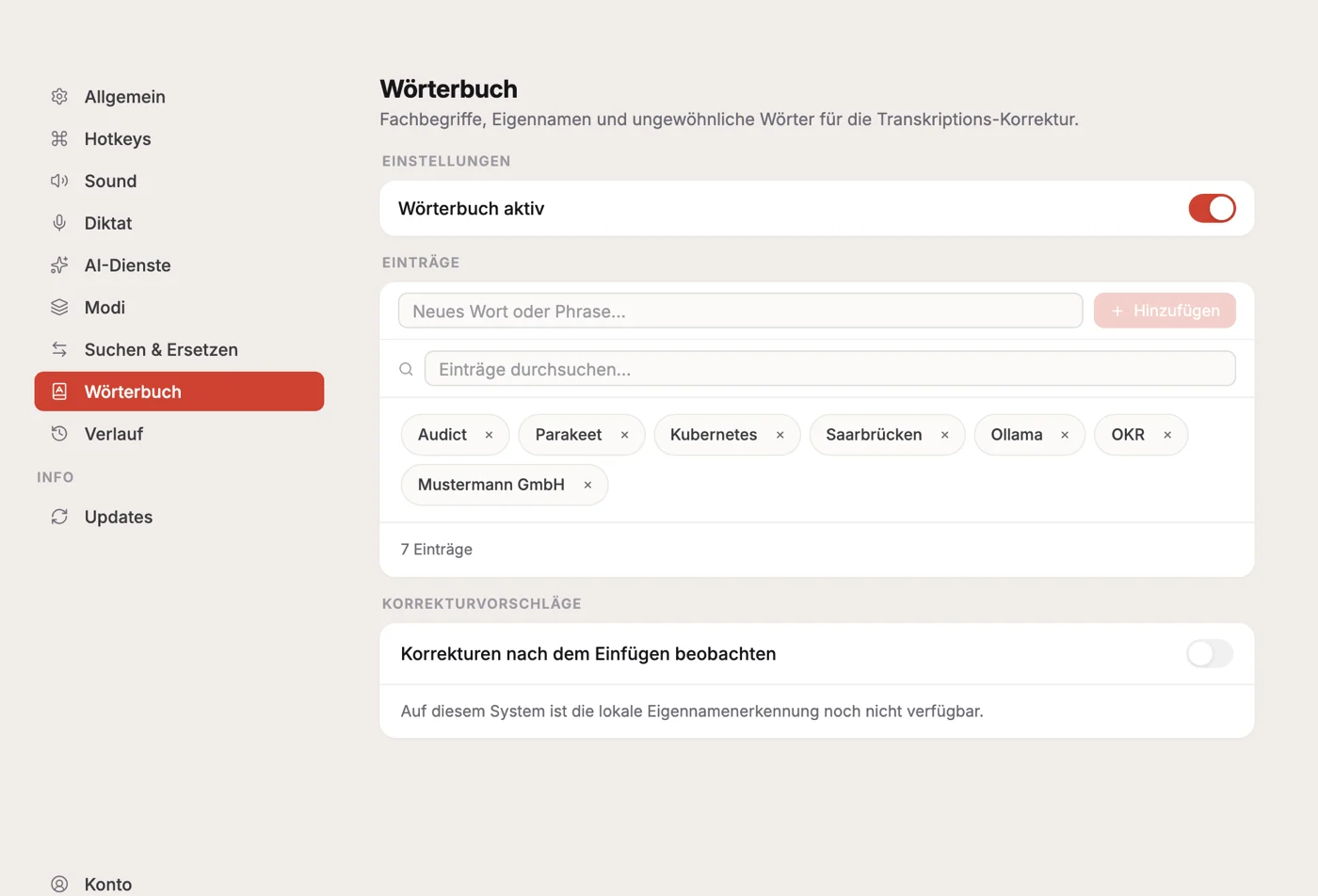
Teach Audict your names, technical terms and abbreviations once.
Dictionary
Add names and technical terms so Audict recognizes them better.
Find & Replace
“KR” becomes “Kind regards”. You set up the rules yourself, also from a CSV file.
25 languages
The standard model recognizes 25 languages, including English and German.
Under the hood
For everyone who wants the details.
- Speech recognition
- Parakeet Ultra, a fine-tuned Parakeet TDT v3. Runs on your computer, recognizes 25 languages and is optimized for Apple Silicon on the Mac.
- Model download
- Mac about 530 MB. Windows about 740 MB, or about 460 MB as a compact version using about 0.75 GB of memory.
- German model (Pro)
- Parakeet TDT Deutsch by primeline.ai, about 530 MB on the Mac and about 860 MB on Windows.
- Your own models
- Whisper as a GGML file, WhisperKit and Parakeet, which you load yourself when needed.
- Systems
- Macs with an M chip (Apple Silicon) running macOS 14 or later, Windows 11 with Intel, AMD or ARM. On Windows, Audict computes on the processor, Whisper models also on the graphics card (Vulkan).
- AI providers (Pro)
- Google Gemini, Anthropic, OpenAI, Groq, Cerebras, OpenRouter, your own OpenAI-compatible server, locally Ollama, LM Studio, vLLM and other OpenAI-compatible servers, on the Mac Apple Intelligence (macOS 26 or later).
Dictate for free. Go Pro when you want more.
Audict Free
€0
- Speech recognition on your computer
- Inserts at the cursor in any app
- Dictionary
- Find & Replace
- History
Audict Pro
€4.99 per month
- Everything in Free
- AI post-processing with modes and trigger words
- Context: selected text, browser address, on the Mac also the screen
- German-language model
Ready in four steps
Download
Install Audict on your Mac or Windows PC.
Allow access
Microphone, and on the Mac also Accessibility for inserting at the cursor.
Pick a hotkey
The shortcut for recording: hold it down for short sentences, or press once to start and stop for longer texts.
Load a model
Create a free account, choose a speech model, done.
Questions before you download
How much does Audict cost?
Speech recognition is free. Audict Pro costs €4.99 per month or €49 per year, VAT included. Pro adds AI post-processing, context and a German-language model.
Does Pro work on more than one computer?
Pro belongs to your account, not to a particular computer. Sign in to Audict with your account and Pro is unlocked there.
Do I need an account?
Yes, a free one, to download speech models and for Pro. You can use your own model files without an account.
Where do my recordings go?
Nowhere. Audict recognizes speech on your computer, and the recording never leaves it.
Does Audict need the internet?
Speech recognition itself runs on your computer. Audict needs a connection for sign-in, model downloads, license checks and updates, and with Pro also for an AI provider in the cloud.
Which languages does Audict recognize?
The standard model recognizes 25 languages, including English and German. The interface is available in English, German, Spanish, French and Japanese.
Will Audict run on my computer?
On Macs with an M chip (Apple Silicon) running macOS 14 or later, and on Windows 11 with Intel, AMD or ARM. Audict 2 is not available for Macs with an Intel processor or for Windows 10. Details on the download page.
What does beta mean?
Audict 2 is new and keeps improving. The app downloads updates itself, and you install them with one click. Bugs and wishes are welcome at support@audict.app.
What does Audict add to the built-in dictation?
Audict has its own dictionary, find and replace rules, a history of your dictations and a hotkey of your choice. Audict Pro adds the AI modes.
- MacmacOS 14 or later, Apple SiliconDownload .dmg
- WindowsWindows 11, x64 (Intel, AMD)Download .exe
- Windows on ARMWindows 11, ARM64 (e.g. Snapdragon)Download .exe